Monster Job Posting
Use these directions to create a posting on Monster's job board website. Your Monster account information must be populated in the System Settings Integration information in order to run this workflow.
1) Click Add Posting under the Monster Postings section of the Job Order's Job Poster Segment.
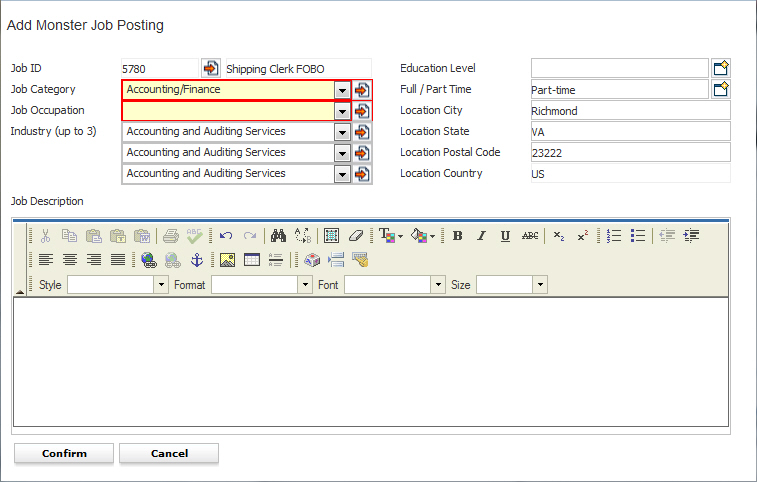
2) The Add Monster Job Posting workflow will open in a new window with the Job Description, and Work Location auto-populated from the data on the Job Poster segment.
3) While updating the form notice that fields marked in red are required to complete the workflow; and that by clicking on the buttons to the right of certain fields, a new window will open, allowing you to search and select options related to that specific field.
4) Click Confirm to complete the process.
Notes:
- The recruiter and staffing company are used for the contact information in the posting.
- Monster has a character limit on job descriptions; the minimum is 25 characters.
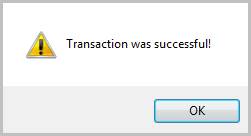
5) Click Ok on the confirmation message that is displayed to advise the posting was transmitted to Monster.
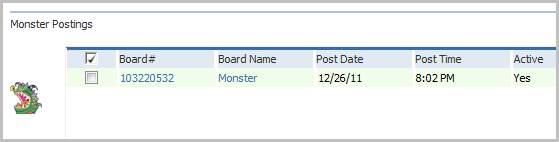
6) The workflow window will close and return you to the Job Poster segment.
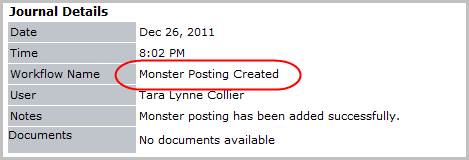
7) Verify the Monster Posting Created entry posted to the journal.