General Activity Report in Excel
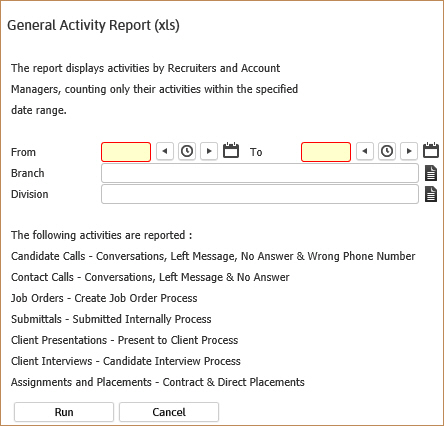
The general activity report is used as an overview of the calls and placement activities for recruiters and account managers within a specified date range. This is a non-detailed report that displays counts for each listed workflow.
- AccessReporting > Reporting & Analytics > System Reports > General.
- Select General Activity (xls) to open the workflow view in a new window.
- While updating the form, fields marked in red are required to complete the workflow. Click on the buttons to the right of certain fields to open a new window which will allow you to search and select options related to that specific field or choose a date.
- The From and To dates are for to journal postings from the date the workflow occurred in the system. This may not be the date the actually activity occurred; for example a candidate may have been submitted to the account manager yesterday but the activity in Adapt did not occur until today, if that is the case then activity will display on the report when today’s date is included in the date range.
- The Branch and Division are additional criteria options to further filter the report results. These options will match the candidate, contact and job order records.
-
The following activities are reported:
- Candidate Calls – from the log a call and left message workflows
- Contact Calls – from the log a call workflow
- New Job Orders – from the create new job and copy job workflows
- Submittals – from the submit internally workflows
- Presentations – from the present to client workflow
- Interviews – from the interview candidate workflow
- Assignments and Placements – from the assign and place candidate workflows
- Submittals that progressed to Presentations
- Presentations that progressed to Interviews
- Interviews that progressed to Assignments/Placements
-
Click Run to generate the report.

- Because this is an Excel report you will receive an option to open or save the report. Select open to proceed or save to review later.
-
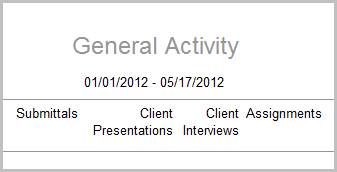
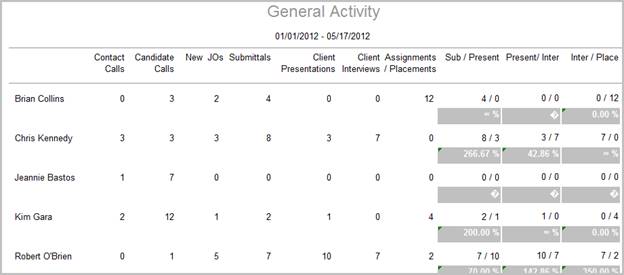
The header displays the report name, dates specified in the workflow and the activity categories.

-
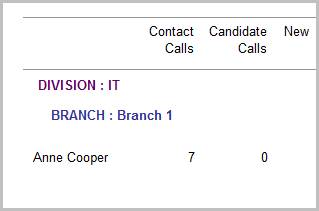
The data is then sorted by Division, Branch and User (Account Manager & Recruiter).

-
Activity category counts come from journal postings with the exception of Client Interviews which are counted from, the input by field in the interview entity with a role of Client Interview.
Note: Because the count is from the journal and input by fields the credit goes to the user who preformed the action in Adapt and which can be different from Account Manager or Recruiter of record.

-
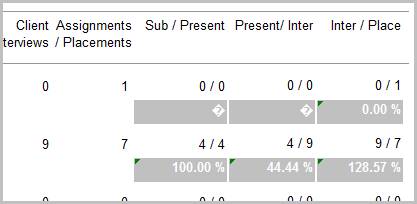
- Sub /Present = Number of Submittals / Number of Presentations
- Present / Inter = Number of Presentations / Number of Interviews
- Inter / Place = Number of Interviews / Number of Placements
- Presentation Percentage = (Presentation / Submittal) * 100
- Interview Percentage = (Interview / Presentation)*100
- Placement Percentage = (Placements / Interview)*100


Full Report
Workflows that Update Report
The following workflows will update the General Activity report:
-
Log a Candidate Call from:
- Left Message workflow from Candidate
-
Log a Contact Call from:
- Assignments/Placements
- Batch
- Contact
- Dashboards
- Job Orders
-
Create a New Job (Contract or Direct) from:
-
Copy Job (Contract or Direct) from:
- Company
- Contact
- Dashboards
- Job Order
- Project
- Activate an Opportunity (Contract or Direct)
-
Submit Internally (Contract or Direct) from:
- Batch
- Candidate
- Dashboards
- Job Order
-
Present to Client (Contract or Direct) from:
-
Interview Candidates from:
- Dashboards
- Job Order
-
Assign Candidate from:
- Batch
- Dashboards
- Job Order
-
Place Candidate from:
- Dashboards
- Job Order