Workers Compensation Report
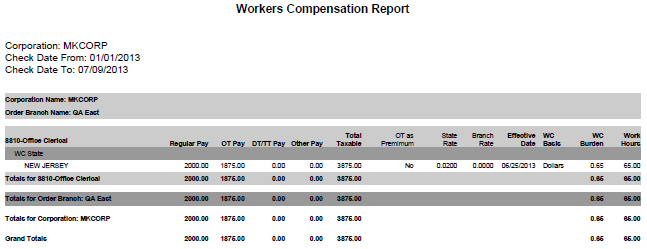
The Workers Compensation Report provides the accrued workers compensation based on Workers Comp Code and burden by PayBill Code, Branch, State and Corporation. It is intended to assist you in reviewing accrued burden amounts for Workers' Compensation.
1) Click Reporting on the main navigation bar and scroll to the Payroll Reports section.
2) Select Workers Compensation Report to enter report criteria.
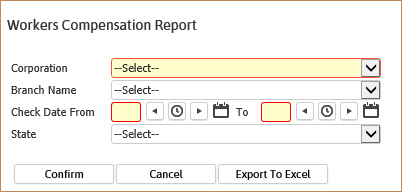
3) After selecting the report, the Workers Compensation Report workflow will open for selection criteria input.
While updating the form, fields marked in red are required to complete the workflow. Click on the buttons to the right of certain fields to open a new window which will allow you to search and select options related to that specific field or choose a date.
Select a Corporation and a Check Date range.
Branch Name and State are both optional processing criteria and can be used to further define the information you want to see on the report.
4) After entering the criteria, click Confirm to generate the report. You can also select Export to Excel to create a .csv file of the report information.
6) The report opens in a new window.
§ The header displays report name and criteria used to generate the report.

§ The data is then grouped and sorted by the criteria chosen in the beginning.
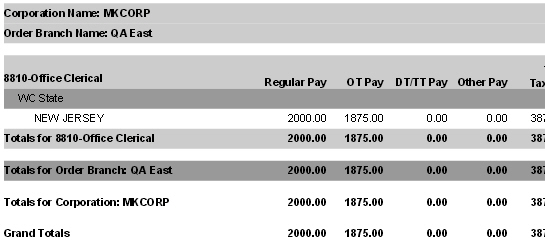
§ 7) Calculations in report:
Totals for Regular Pay, Overtime (OT) Pay, Doubletime/Tripletime (DT/TT) Pay, Other Pay, Total Taxable, Workers Comp (WC) Burden and Work Hours.
Total for Workers Compensation Code, Branch, Corporation and finally, a Grand Total.
NOTE: The report uses the Effective Date on the Workers Compensation Code Detail record to determine the rate to use for calculating Workers Comp amounts.
Full Report