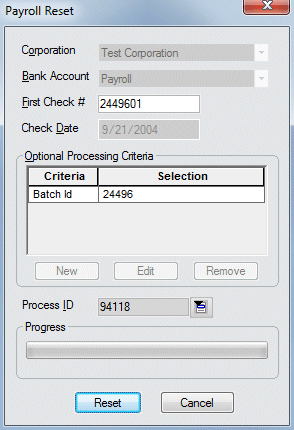
Reset Payroll Screen


|
Reset Payroll Screen |
|

Click here to return to the Reset Payroll main topic page.
|
Corporation |
The corporation (Federal tax ID) associated with this payroll process. The field may not be edited. |
|
|
|
|
Bank Account |
The bank account from which the payroll checks will be paid. The field may not be edited. |
|
|
|
|
First Check # |
The first check number in the payroll process. You may edit this field if you do not want all of the checks reset in the process. If this is the case, simply enter the first number of the checks you DO want reset. |
|
|
|
|
Check Date |
The calendar date of the checks being processed. The field may not be edited. |
|
|
|
|
Optional Processing Criteria |
All optional processing criteria selected for this payroll process. Optional processing criteria allows you to further group the way the system processes payroll. For example, you can process only a specific batch ID or bill group or service line. The field may not be edited. |
|
|
|
|
Process ID |
Unique number identifying the payroll process. The field may not be edited. |
|
|
|
|
Progress |
This bar shows the progress of the reset process. |
|
|
|
|
Reset |
Click this button to begin the reset process based on the criteria entered. |
|
|
|
|
Cancel |
Click this button to close the window without resetting payroll. |
|
|
|
Related Topics:
|
|