Reset Direct Deposit Screen


|
Reset Direct Deposit Screen |
|

Click here to return to the Reset Direct Deposit main topic page.
|
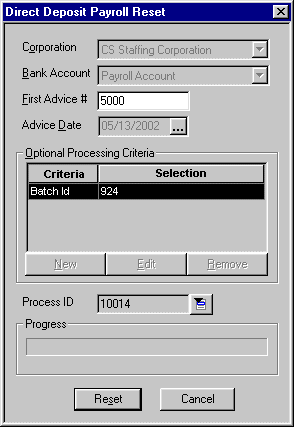
Corporation |
The corporation (Federal tax ID) associated with this direct deposit process. The field may not be edited. |
|
|
|
|
Bank Account |
The bank account from which the direct deposit advices will be paid. The field may not be edited. |
|
|
|
|
First Advice # |
The first advice number in the direct deposit process. You may edit this field if you do not want all of the advices reset in the process. If this is the case, simply enter the first number of the advices you DO want reset. |
|
|
|
|
Advice Date |
The calendar date of the advices being processed. The field may not be edited. |
|
|
|
|
Optional Processing Criteria |
All optional processing criteria selected for this direct deposit process. Optional processing criteria allows you to further group the way the system processes direct deposit. For example, you can process only a specific batch ID or bill group or service line. The field may not be edited. |
|
|
|
|
Process ID |
Unique number identifying the direct deposit process. The field may not be edited. |
|
|
|
|
Progress |
This bar shows the progress of the reset process. |
|
|
|
|
Reset |
Click this button to begin the reset process based on the criteria entered. |
|
|
|
|
Cancel |
Click this button to close the window without resetting direct deposit. |
|
|
|
Related Topics: